


As a newcomer to the OpenStack world, with quite a bit of VMware and some AWS experience, I thought it would be worthwhile documenting some of the basics as I learn. Hopefully, this will provide something useful for others with a background in either technology, who choose to follow the same path in the future. In many ways, this is planned to be as much to solidify my understanding, as anything else!
Also, it’s probably worth noting that I may express some opinions throughout this series as to where one technology may suit specific workloads better than another. This certainly does not constitute me expressing a preference for one or another! I’m lucky enough to have a day job where I work with a huge range of great technologies; each has their own place in today’s enterprises. The technology should fit the use case – Technology Agnosticism FTW! 🙂
The Basics
Firstly, a few key basics and observations!
- OpenStack is a collection of different tools and technologies, most of which are entirely interchangeable and / or optional. For example, you could choose to use any of a huge number of hypervisors, such as KVM, Xen, VMware, etc, each of which will have their own pros and cons. I will try to dig into one or two of these when I do a post on Nova, later.
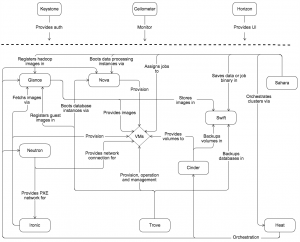
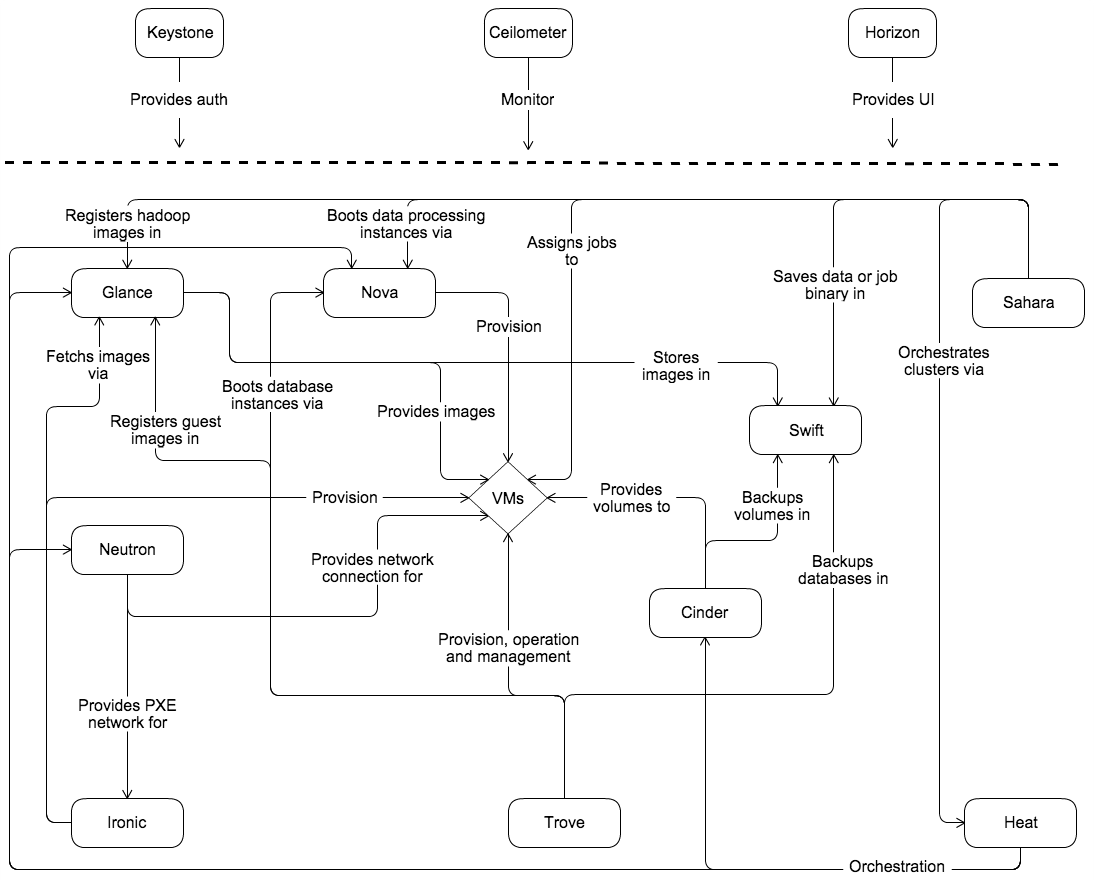
- OpenStack is quite a complex beast, and most certainly not a simple monolithic stack. Within each of the separate elements of OpenStack (known as “OpenStack services“) there are actually multiple independent processes, all of which do different tasks within their specific service. Here is a quick conceptual diagram which describes a typical solution and all of the interconnecting services:
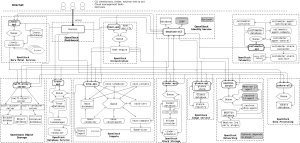
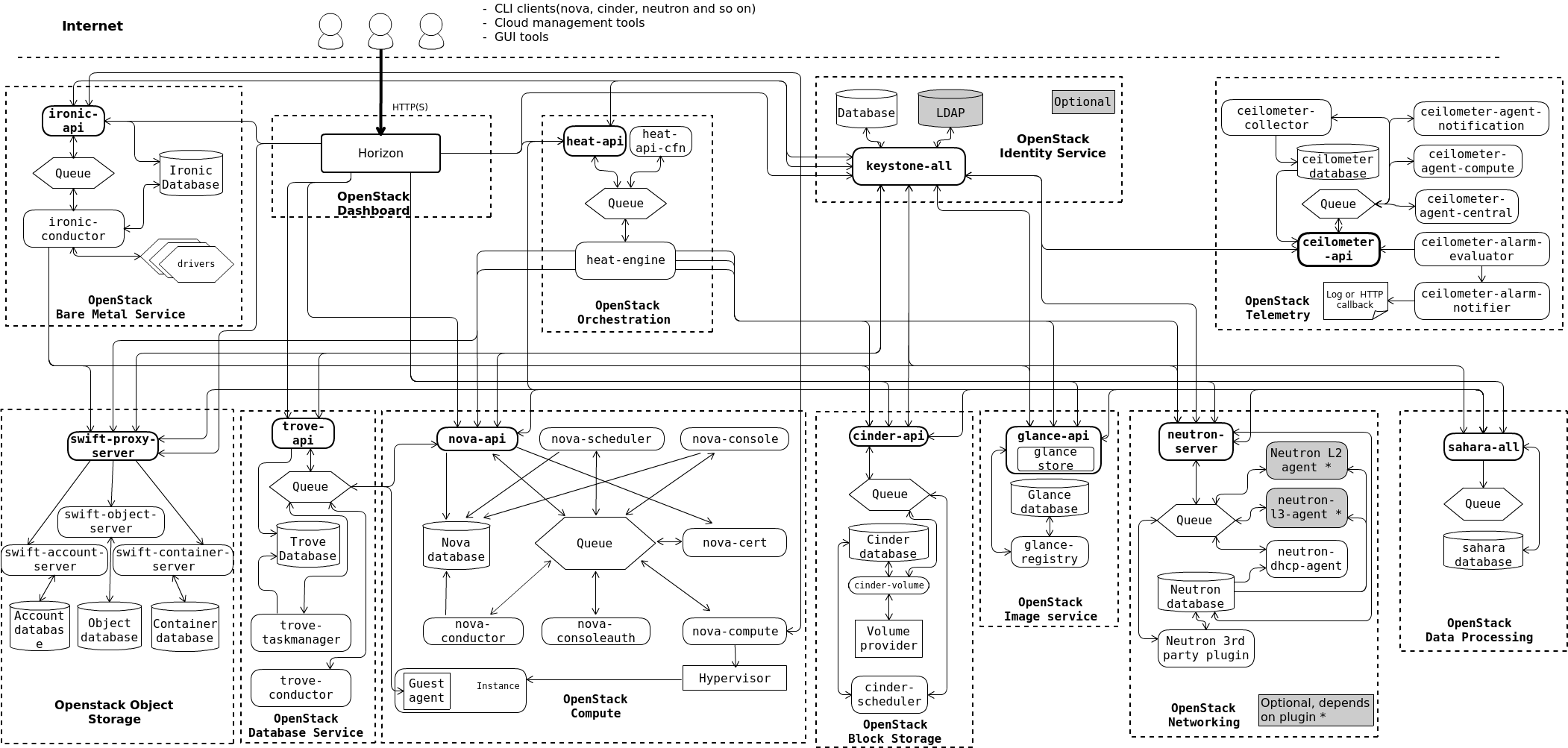
- Taking that a stage further, there is also a far more complex diagram which shows all of the logical processes in a typical architecture as well!
- Keystone is the most critical service of all, as it is the glue which binds all other OpenStack Services together. As you add more services into your stack, they all register back to Keystone to provide service discovery, API client authentication and a number of other functions. The closest equivalent in vSphere is the PSC. In AWS it would be IAM, but IAM is mainly about the permissions and security elements only, compared to the broad set of functions Keystone provides.
- If you are an AWS developer and don’t want to have to re-learn or re-write all of your API calls for your software, you don’t have to! You could use HPE Helion Eucalyptus to effectively provide an AWS-compatible API for your OpenStack cloud – that’s pretty cool!
- OpenStack is still being developed at a huge rate of knots! The releases come out every 6 months and are named alphabetically. We are already at M (Mitaka), with N (Newton) coming out imminently! It’s definitely getting pretty mature as a platform, and I suspect that’s probably why many more enterprises are being quite vocal about looking at it for their private clouds these days.


Building OpenStack
The control plane and proxy services can all be run as containers. A typical highly-scalable design pattern is therefore a set of physical hosts running containers for all management / API / control processes. You then add one or more separate compute and storage clusters based on your scalability and resilience requirements. For a test lab, you can collapse these onto as little as a single physical host if you use nested instances.
In fact, it will even install in as little as 8GB of RAM, as Eric Wright described in his blog post here about installing on top of OSX. This was based on the 2nd Edition of the awesome OpenStack Cloud Cookbook from Kev Jackson and Cody Bunch. I also did a recent review of the book, for those who are interested.
Vagrant is an excellent way to help get started quickly as it will pull down images and spin up machines very quickly, with minimal effort. It supports multiple environments from VirtualBox and VMware to Docker and even AWS.
The fact that OpenStack is designed from the ground up with automation in mind means you can do some really amazing stuff with it. For example, the other day I was at a presentation where my colleague @the_cloudguru deployed a development stack on his laptop using just 3 lines of OpenStack Ansible code! Very impressive!
Closing Thoughts
I’m still really early in my OpenStack learning journey, but as my knowledge builds I will expand on this series. If you do see any errors in the information in this series, please don’t hesitate to let me know!