



Continuing in this series of blog posts taking a bit of a “warts and all” view of a few Amazon AWS features, below are a handful more tips and gotchas when designing and implementing solutions on Amazon AWS, including Dedicated VPCs.
For the first post in this series with a bit of background on where it all originated from, see here:
Amazon #AWS Tips and Gotchas – Part 1
For more posts in this series, see here:
Index of AWS Tips and Gotchas
AWS Tips and Gotchas – Part 6
12. AWS Dedicated VPCs
Just a quick one this week, specifically something to watch out for otherwise you risk running up a scary bill very quickly!
When you create a new VPC, you have the option to create it as Default or Dedicated as per the screenshot below:
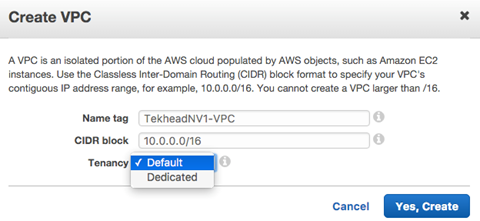
Now here’s the rub… if you select dedicated VPC, this will actually cause every single EC2 instance from then on to be created on dedicated hardware (what AWS call single-tenant hardware, i.e. dedicated physical servers!) by default, within that VPC.
Also note that as per the Dedicated Instances KB article, “You can’t change the instance tenancy of a VPC after you create it”.
In other words, if you find you have created your VPC as a dedicated one, you will have to destroy and re-create everything within that VPC to get it back to default (i.e. multi-tenant/shared compute).
Find more posts in this series here:
Index of AWS Tips and Gotchas
Amazon AWS Tips and Gotchas – Part 7 – AWS EMR, Spot Instances & PGs