



Continuing in this series of blog posts taking a bit of a “warts and all” view of a few Amazon AWS features, below are a handful more tips and gotchas when designing and implementing solutions on Amazon AWS, specific to Direct Connect.
For the first post in this series with a bit of background on where it all originated from, see here:
Amazon #AWS Tips and Gotchas – Part 1
For more posts in this series, see here:
Index of AWS Tips and Gotchas
Tips and Gotchas – Part 4
10. VPC Private / Public Access Considerations
If you have gone out and bought a shiny new Direct Connect to your AWS platform, you might reasonably assume that all of the users and applications on your MPLS will automatically start using this for accessing S3 content and other AWS endpoints. Unfortunately, this is not so simple!
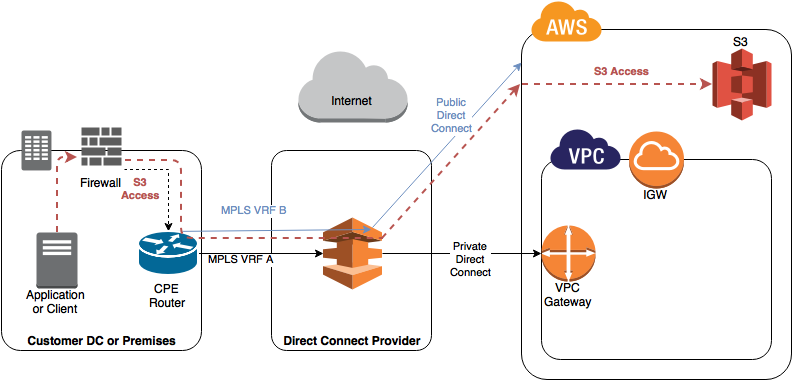
At a high level, here is a diagram showing the two primary Direct Connect configurations, Public and Private:
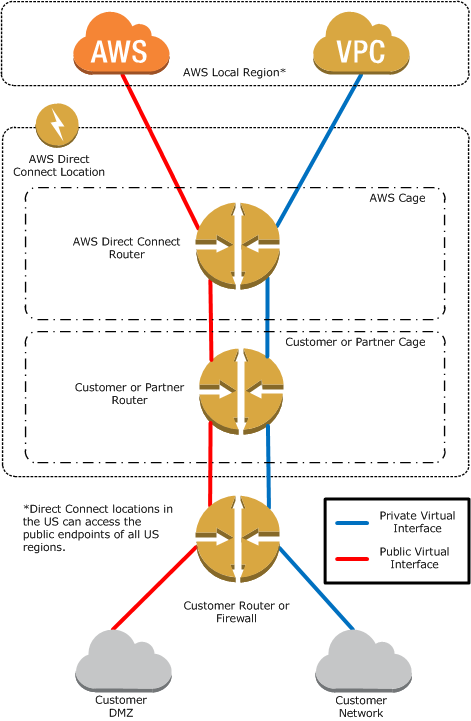
AWS Direct Connect by Camil Samaha
A key point to note about Direct Connect is that it supports multiple VIFs per 1Gbps or 10Gbps link:
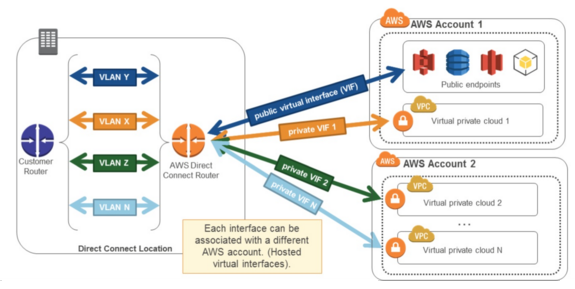
The question therefore becomes, what is the cost-effective and simple solution to access service endpoints (such as S3 in the examples below), when you also want to access your private resources in your own VPCs?
This is not always a straight forward answer if you are on a tight budget.
Accessing S3 via your Direct Connect
As I understand it, the S3 endpoint acts very much like VPC peering, only it is from your VPC to S3, and is therefore subject to similar restrictions. Specifically, the S3 endpoint documentation has a very key statement:
“Endpoint connections cannot be extended out of a VPC. Resources on the other side of a VPN connection, a VPC peering connection, an AWS Direct Connect connection, or a ClassicLink connection in your VPC cannot use the endpoint to communicate with resources in the endpoint service”.
Basically this means for every VPC you want to communicate with directly from your MPLS, you need another VIF, and hence another connection from your service provider. If you want to access S3 services and other AWS public endpoints directly, you will also need an additional connection dedicated to that. This assumes your requirements are not enough to justify buying a 1Gbps / 10Gbps pipe for your sole use, and are using a partner to deliver it. If you can buy 1Gbps or above then you can subdivide your pipe into multiple VIFs for little / no extra cost.
Here are four example / potential solutions for different use cases, but they are definitely NOT all recommended or supported.
- Assuming you are using a Private VIF, then by default, the content in S3 is actually accessed over the internet (e.g. using HTTPS if you bucket is configured as such):
This may come as a surprise to people, as you would expect to buy a connection and access any AWS service.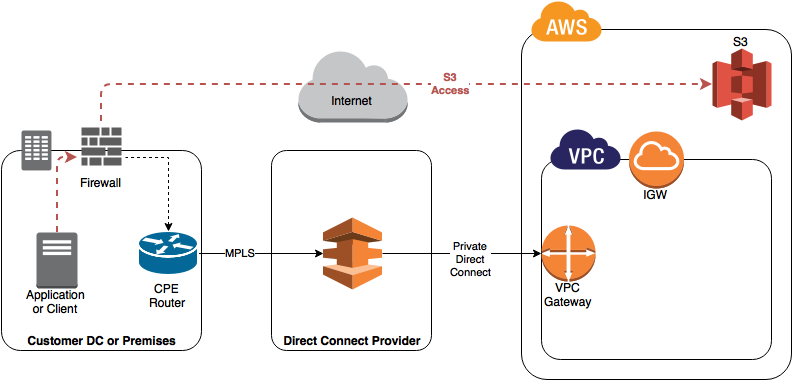
- If you have a Direct Connect from your MPLS into Amazon as a Public connection / VIF you can then route to the content over your Direct Connect, however this means you are bypassing your VPC and going straight into Amazon.
This is a bit like having a private internet connection, so accessing VPCs etc securely would still require you run an IPsec VPN over the top of your “public” connection. This will work fine and will mean you can maximise the utilisation of the bandwidth on your direct connect, reduce your Direct Connect costs by sharing one between all VPCs. This is OK, but frankly not brilliant as you are ultimately still depending on VPNs to secure your data. If you want very secure, private access to your VPCs, you should really just spend the money! 🙂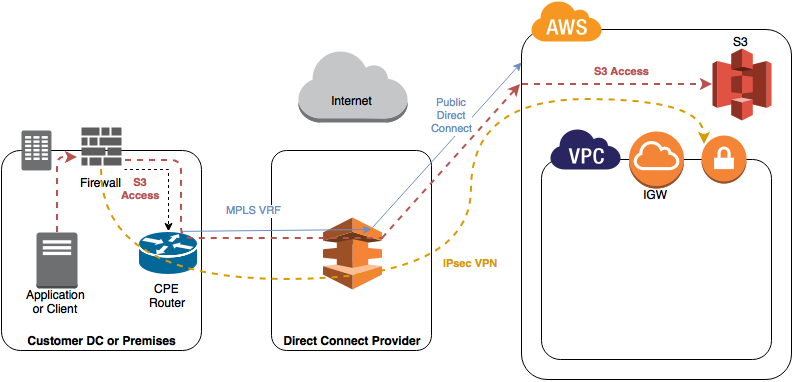
- If you have a Direct Connect from your MPLS into Amazon as a Private connection / VIF, you could proxy the connectivity to S3 via an EC2 instance. The content is requested by your instance using the standard S3 API and forwarded back to your clients. This means your EC2 instance is now a bottleneck to your S3 storage, and if you want to avoid it becoming a SPoF, you need at least a couple of them.
It is worth specifically noting that although technically possible, this method would be strictly against all support and recommendations from AWS! S3 Endpoints and VPC peers are for accessing content from your VPCs, they are NOT meant to be transitive.
- Lastly, Amazon’s primary recommended method is to run multiple VIFs, mixing both public and private. This biggest downside here is that each VIF will likely have a specific amount of bandwidth associated with it and you will have to procure multiple connections from your provider (unless you are big enough to need to buy a minimum of 1 Gbps!).
As this scales to many accounts, many VPCs and many VIFs, things also start to get a bit complex when it comes to routing (especially if you want many or all of the VPCs in question to be able to route to eachother), and I will cover that in the next post.
Until then…

http://www.tekhead.org/tag/awsgotchas/
Amazon AWS Tips and Gotchas – Part 5 – Managing Multiple VPCs